
BOUTIQUE TUTORIALS
“How To” PDF Files

The Evolux Boutique is your all-in-one platform where you can manage your Evolux benefits, unlock valuable rewards, and do it all in the same place where you place orders and reward patients through Evolus Rewards!
What can you do there?
✅ Manage your Co-Branded Media Marketing benefits
✅ Access Exclusive Educational Resources
✅ Redeem Promotional Swag to elevate your practice* (starting later in Q1 2025)
Your Evolux status and benefits can take up to 1 hour to update after order has been placed. Please check back at a later time!
After you’ve redeemed a benefit, the Evolux team will reach out to you on next steps. You can also visit the Redemption History page to track the details and status of your benefits.
Please see instructions below:
Note: Only Admin Users have access to add/remove users.
- Select the hamburger icon in the top right-hand corner
- Select Account settings
- Under User Permissions, select Invite New User
- Add necessary information and select Limited role, then select Evolux Boutique (if you uncheck Evolux Boutique, user will not have access to Evolux Boutique, but will still have access to Rewards)
- Click Send Invite (Please review and select the permission that you would like the New User to have)
- The New User will receive an email to create their unique password to log in to the Practice App/Portal.
You can remove users under the User Permission tab. Select the user you would like to remove, and in the top right-hand corner, there’s an option to remove the user.
Once your campaign has ended, you will receive an email to request a report. You can click on the email link to make the request. You can also request the report using the chatbot.
You must actively monitor the phone and email provided to Evolus. Leads are sent in real-time, so timely responses are crucial—patients typically expect replies within 15 minutes during business hours or by the next day if after-hours. Ensure you monitor your designated contact details and have an active voicemail setup to avoid missing “hot leads.”
The number displayed on your campaign is a trackable vanity number provided by Evolus to monitor call activity. It forwards directly to the phone number you provided.
No custom billboards allowed, only the Evolux legally provided approved templates can be used.
Submit all billboard edit requests together in one email thread. Only one round of edits is allowed per billboard.
Please allow up to 4 weeks for delivery of your Merch order. You will receive a confirmation email once your redemption has been received, and another confirmation email once your order has been shipped. The shipping confirmation email will contain the tracking number. If you still have not received the shipping confirmation email after 4weeks, please fill out this form and our Customer Experience team can further assist you.
As you are redeeming your Merch benefits, please review all customizations in detail to ensure the information provided is accurate. Please use the ‘Edit’ button to make any revisions. Once your order is submitted, we cannot make changes.
It will take up to 1 hour after an order has been placed for benefits to display. Please check back then. If there is still no change after 1 hour, please contact us for support.
No, all Merch quantities must be redeemed in the same order.
You can find your Merch order tracking number in the shipping confirmation email from the Evolux Team. If you have not received your shipment confirmation after 4 weeks, please contact us for support.
Before the call connects, you’ll hear a "Whisper Message" indicating it’s a lead from your Evolus campaign. We can also provide calls that come in via your campaign’s trackable vanity number.
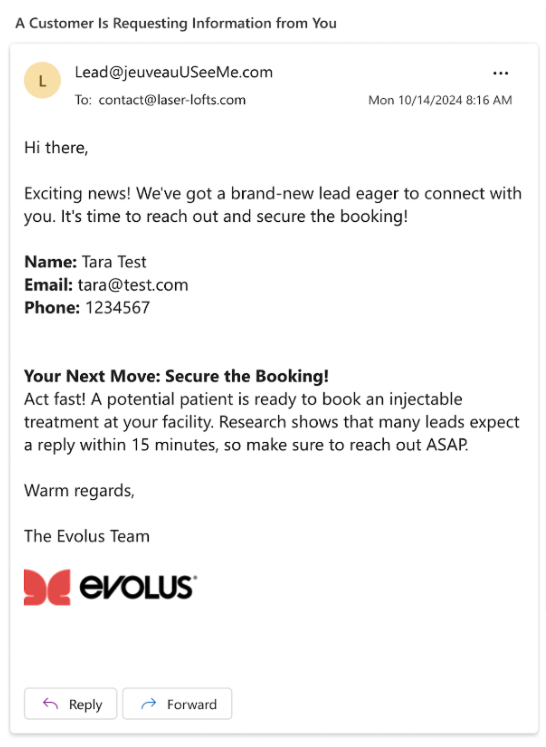
You will receive lead notifications in real time via email from Lead@jeuveauUSeeMe.com. Be sure to add this email to your contacts and check regularly to ensure it doesn’t go to spam or junk folders. NOTE: Do not reply to the notification email itself—start a new email thread to contact the lead using the information provided.
Lead notification emails provide contact details for potential patients. You are responsible for reaching out to the lead directly using the provided information. The subject line is: “A Customer is Requesting Information from You.”
There are six point-based Evolux Statuses:
- Member (0-39 pts)
- Silver (40-149 pts)
- Gold (150-319 pts)
- Diamond (320-499 pts)
- Elite (500-749 pts)
- Elite+ (750+ pts)
With the launch of the new Evolux program, in addition to earning benefits, Custom accounts will now have Evolux Statuses in the Evolux Boutique.
Please see details here (link to 2-pager DSA) to learn more about Evolux Statuses and what benefits you can unlock with each status.
You can earn points by simply purchasing Jeuveau and Evolysse – 2 points per vial of Jeuveau and 1 point per syringe of Evolysse purchased within the quarter. Your cumulative Evolux Points determine your quarterly Evolux Status, unlocking exclusive benefits per quarter.
Please see details here to learn more about Evolux Statuses and what benefits you can unlock with each status.
Your points will reset to 0 at the end of each quarter. You will have until the end of the following quarter to redeem your benefit. For example, if you earn 500 points total for Q2, these points will reset to 0 at the end of Q2 (at 11:59pm PT), and you will have until the end of Q3 to redeem your benefit.
You can view your points in the MyEvolus Home page. You can redeem your benefits in the Evolux Boutique.
There is no rolling over or combining points or benefits between quarters.
Your Evolux status is displayed in the Evolux Boutique homepage top welcome banner. Starting April 1, 2025, your Evolux status in the Evolux Boutique will be your portfolio benefit status, which is separate from your Evolux pricing tiers. The new Evolux pricing tiers will launch on April 18, 2025.
No, you cannot replace a Q1 2025 benefit with a Q2 2025 benefit. You can, however, still redeem a Q1 2025 benefit in Q2 2025.
Exclusive benefits redeemed by the Evolux Marketing Team will count toward your one benefit redemption for the quarter. Once redeemed, the benefit will appear in your Boutique Redemption History.
Please note: because this is not an evergreen benefit, the status will remain marked as ‘Redeemed’ even as the campaign progresses.
Portfolio status is updated only after an order is shipped. Post shipping an order, it will take ~20 minutes to reflect the points and Portfolio status.
